Key takeaways
- Our in-depth Razer Pro Type Ultra review covers silent switches, wireless range, battery life, comfort, and the best quiet mechanical keyboard alternatives.
Razer Pro Type Ultra Review: A Quiet Mechanical Keyboard Built for Long Workdays
This razer pro type ultra review looks at a wireless mechanical keyboard designed for people who type all day and want the feel of mechanical switches without the noise. The short answer: the Razer Pro Type Ultra is one of the best quiet mechanical keyboards for office work and home offices, thanks to its silent linear switches, sound-dampening foam, plush wrist rest, and the ability to switch between up to four devices. It is a large, full-size board with a white finish, and its best features depend on Razer software, so it is not the right pick for everyone.
Quick Picks
| Keyboard | Best For | Connectivity | Layout |
|---|---|---|---|
| Razer Pro Type Ultra | Quiet mechanical typing at work | Bluetooth, HyperSpeed 2.4 GHz, USB-C wired | Full-size with number pad |
| Keychron K8 Pro | Customization and hot-swappable switches | Bluetooth, 2.4 GHz, USB-C wired | Tenkeyless |
| Logitech G915 X Lightspeed | Gaming with a low-profile board | Lightspeed 2.4 GHz, Bluetooth, USB-C wired | Full-size with number pad |
| Keychron Q6 Pro | Full-size mechanical typing with QMK support | Bluetooth, 2.4 GHz, USB-C wired | Full-size with number pad |
| NuPhy Air75 V2 | Compact desks and travel | Bluetooth, 2.4 GHz, USB-C wired | Compact 75 percent |
How to Choose
Switch Feel and Noise
Switches decide how a keyboard feels and sounds more than any other part. The Pro Type Ultra uses Razer Yellow silent linear switches, which travel smoothly from top to bottom with no tactile bump and no click. Razer pairs them with sound-dampening foam inside the case, so keystrokes land softly instead of clacking. That combination is the whole point of this board: mechanical feel, office-friendly volume.
Linear switches suit fast typists who like a consistent, light press. Tactile switches add a small bump halfway down, which some typists prefer for feedback, and clicky switches add an audible click that is best kept away from shared rooms. If you work in an open office, take calls at your desk, or type late at night near other people, silent linear or silent tactile switches are the safest choice. If you mostly type alone and love feedback, a tactile board such as the Keychron K8 Pro with Brown switches may feel more satisfying.
Connectivity and Multi-Device Switching
A modern wireless keyboard should connect in more than one way. The Pro Type Ultra offers three: Bluetooth, Razer’s HyperSpeed 2.4 GHz wireless through the included Productivity Dongle, and wired USB-C. It pairs with up to four devices at once, so you can move between a desktop, a laptop, an Android tablet, and a TV screen without pairing and unpairing each time.
Bluetooth is the flexible option because it works with almost any laptop, tablet, or phone, and it supports multi-device pairing. A 2.4 GHz receiver gives a faster, more stable connection, which matters for gaming and for desks where Bluetooth interference is a problem. Wired USB-C is the fallback for charging and for zero-lag input. When you compare boards, count how many devices each one can remember, and check whether switching between them takes one keypress or a trip into settings.
Layout and Desk Space
The Pro Type Ultra is a full-size keyboard with a number pad, function keys, and a media control cluster, plus a wide wrist rest. It measures about 439 mm wide, so it needs a generous desk. That layout suits data entry, spreadsheets, and anyone who uses the number pad daily. It also means your mouse sits further to the right, which can strain the shoulder over long sessions.
Tenkeyless boards such as the Keychron K8 Pro drop the number pad and pull the mouse closer to your body. Compact 75 percent boards such as the NuPhy Air75 V2 go further, trimming navigation keys into a smaller frame that fits small desks and travel bags. Before you buy, measure your desk, check whether you actually use a number pad, and remember that a wrist rest adds several centimetres of depth.
Battery Life and Backlighting
Battery life on wireless keyboards varies enormously, and backlighting is the biggest drain. Razer rates the Pro Type Ultra at up to 214 hours over Bluetooth and up to 207 hours over HyperSpeed with the backlight off. Turn the white backlight up and that figure falls sharply, which is true of every backlit board. The Keychron K8 Pro is rated at up to 240 hours with its backlight off, while the gaming-focused Logitech G915 X Lightspeed is rated at up to 36 hours, a reminder that per-key RGB lighting and high report rates cost battery life.
Look for the battery figure with the backlight on, not just the headline number, and prefer USB-C charging so you can top up with a standard phone charger.
Build Quality and Keycaps
A keyboard you type on for eight hours a day should feel solid, not hollow. The Pro Type Ultra uses a sturdy frame with sound-dampening foam, soft-touch fingerprint-resistant keycaps, and a plush leatherette wrist rest in the box. Razer rates its switches for up to 80 million keystrokes, a durability figure that puts it in line with premium mechanical boards.
Keycap material matters for long-term wear. ABS keycaps, like those on the Pro Type Ultra, feel smooth and can develop shine over years of heavy use. Double-shot PBT keycaps, found on boards such as the Logitech G915 X Lightspeed, resist shine and wear better and keep their legends crisp. Aluminium frames, like those on the Keychron K8 Pro and Q6 Pro, add weight and rigidity and reduce case flex. If you type hard, a heavier board that stays put on the desk is worth the extra weight.
Software and Customization
Software unlocks the best features of most premium keyboards. The Pro Type Ultra works with Razer Synapse, which lets you remap keys, record macros, and adjust backlighting. The Keychron K8 Pro and Q6 Pro use QMK and VIA firmware, which lets you remap every key and layer without installing brand software, and both are hot-swappable, so you can change switches without soldering.
Think about how much customization you actually want. If you like setting up macros and per-app shortcuts, a board with strong software support earns its keep. If you want to swap switches, try different keycaps, or remap keys on any computer, a hot-swappable QMK board is the better starting point. And check operating system support before you buy: some companion software is Windows only, which limits customization on Mac.
The Best Razer Pro Type Ultra Review Reviewed
1. Razer Pro Type Ultra
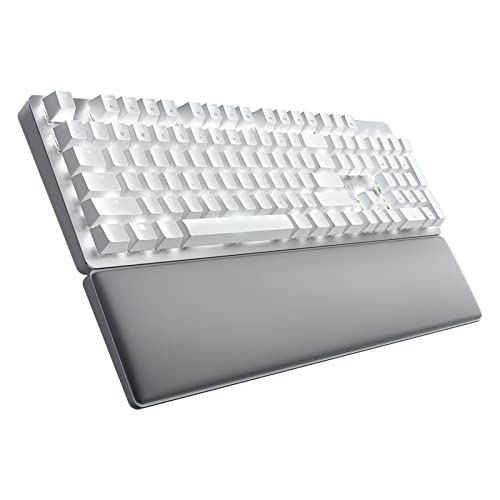
The Razer Pro Type Ultra is a full-size wireless mechanical keyboard built for productivity, and it is the lead pick in this review. Its defining feature is quiet typing: Razer Yellow silent linear switches and internal sound-dampening foam keep keystrokes soft, so it suits open offices, shared workspaces, and late-night typing. The switches are rated for up to 80 million keystrokes, and the slightly concave, soft-touch keycaps guide your fingers while resisting fingerprints.
Comfort is the second strength. The keyboard has an ergonomic design with a comfortable typing angle, and the plush leatherette wrist rest included in the box cushions your wrists during long sessions. The white backlight is subtle rather than showy, with individually lit keys that stay readable in a dim room.
Connectivity is generous. The board pairs with up to four devices over Bluetooth and Razer HyperSpeed 2.4 GHz wireless, and it also works wired over USB-C. The included Productivity Dongle can be shared with a compatible Razer mouse, which keeps your desk free of extra receivers. Battery life is rated at up to 214 hours over Bluetooth and up to 207 hours over HyperSpeed with the backlight off, so most people will go weeks between charges.
For gaming, the Pro Type Ultra is capable rather than specialized. It supports 14-key rollover and the HyperSpeed connection is fast and stable, so it handles casual and even serious play. It lacks the ultra-fast actuation and per-key RGB lighting of a dedicated gaming board, and its full-size frame takes up a lot of desk space. Its strengths are typing feel, quiet operation, and all-day comfort, and on those measures it is hard to beat.
One limitation to note is software dependence. Remapping keys, recording macros, and fine-tuning the backlight need Razer Synapse, and Mac users get less from the software side than Windows users. The board is also bulky, so it is a poor fit for small desks or frequent travel. But for a quiet, comfortable, full-size mechanical keyboard for work, the Pro Type Ultra remains a strong choice.
- Check on Amazon: Check on Amazon
2. Keychron K8 Pro
The Keychron K8 Pro is the best alternative for people who want to customize everything. It is a tenkeyless wireless mechanical keyboard with hot-swappable switches, so you can change switches without soldering, and it runs QMK and VIA firmware, so every key can be remapped and every layer reprogrammed. It connects over Bluetooth 5.1 with up to three devices, 2.4 GHz wireless, or USB-C wired, and it ships with tactile Brown switches, south-facing RGB backlighting, and both Mac and Windows keycaps in the box.
The aluminium frame and internal foam dampening give it a solid, pleasant sound and a sturdy feel that belies its size. Battery life is rated at up to 240 hours with the backlight off. The trade-off is the tenkeyless layout: there is no number pad, so number-heavy work needs an external pad or a different board.
- ASIN: Not verified at writing time — search the full product name on Amazon to confirm the current listing.
3. Logitech G915 X Lightspeed
The Logitech G915 X Lightspeed is the alternative for gamers who want a wireless mechanical board. Its low-profile GL mechanical switches actuate at 1.3 mm, so key presses register faster than on a standard board, and the 2.4 GHz Lightspeed connection is effectively as fast as wired. Tri-mode connectivity covers Lightspeed, Bluetooth, and USB-C, so it can switch between a gaming PC and other devices.
The aircraft-grade aluminium body and double-shot PBT keycaps feel built to last, and per-key RGB lighting, dedicated media controls, and programmable G-keys round out a board made for serious play. The trade-offs are battery life, rated at up to 36 hours, which falls fast with RGB lighting on, and the low-profile keycaps, which take some getting used to if you come from a full-height board.
- ASIN: Not verified at writing time — search the full product name on Amazon to confirm the current listing.
4. Keychron Q6 Pro
The Keychron Q6 Pro is the alternative for typists who want a full-size board with deep customization. Like its tenkeyless sibling, it is a QMK and VIA wireless mechanical keyboard with hot-swappable switches, an aluminium frame, and Bluetooth, 2.4 GHz, and USB-C connectivity. The difference is the layout: a full 100 percent design with a number pad, function row, and navigation cluster, which suits spreadsheets, data entry, and anyone who refuses to give up the numpad.
Because it shares the K8 Pro’s open firmware and hot-swappable design, it appeals to the same audience: people who want to choose their own switches, remap keys freely, and keep the board for years.
- ASIN: Not verified at writing time — search the full product name on Amazon to confirm the current listing.
5. NuPhy Air75 V2
The NuPhy Air75 V2 is the alternative for small desks and portable setups. It is a compact 75 percent low-profile wireless mechanical keyboard with hot-swappable switches and Bluetooth, 2.4 GHz, and USB-C connectivity. The slim frame slips into a bag easily, and the shorter key travel of low-profile switches makes it quick to type on once you adjust to the feel.
The trade-offs are inherent to the size. There is no number pad, the function row shares keys with the number row, and the compact layout takes a few days to learn if you come from a full-size board.
- ASIN: Not verified at writing time — search the full product name on Amazon to confirm the current listing.
What to Check Before You Buy
Check the switch type first. Silent linear switches suit shared spaces, tactile switches suit typists who want feedback, and clicky switches suit private rooms. The Pro Type Ultra only comes with silent linear switches, so if you want a tactile bump, look at the Keychron alternatives instead.
Check the layout against your desk and your work. Full-size boards need room for the keyboard, the wrist rest, and the mouse. Measure before you order, and confirm the board has the number pad, function keys, and media controls you actually use.
Check connectivity and device limits. Confirm how many devices the board can remember, whether switching is a single keypress, and whether the software you need runs on your operating system. Mac users should confirm key layout and software support in particular.
Check battery expectations with the backlight on. Headline battery figures are usually measured with the lights off. If you type in a dark room with backlighting on, expect far fewer hours between charges, and keep a USB-C cable at your desk.
Check the return policy and warranty before ordering. Keyboards are personal: switch feel, key spacing, and wrist angle are hard to judge from a listing. A straightforward return window lets you type on the board for a few days and send it back if the feel is wrong.
FAQ
Is the Razer Pro Type Ultra good for office use?
Yes. It is designed for office and home-office work. The silent linear switches and sound-dampening foam keep typing quiet, the wrist rest supports long sessions, and multi-device pairing lets it switch between a work laptop and a personal machine. Its white finish and understated backlighting also suit professional desks better than gaming-styled RGB boards.
Does the Razer Pro Type Ultra work with Mac?
It connects to Mac over Bluetooth and works as a keyboard, but its best features depend on Razer Synapse, which is primarily a Windows application. Mac users should expect basic functionality and limited customization. If Mac support is a priority, the Keychron K8 Pro and Q6 Pro include Mac keycaps and work with VIA on Mac.
How long does the battery last on the Razer Pro Type Ultra?
Razer rates it at up to 214 hours over Bluetooth and up to 207 hours over HyperSpeed wireless with the backlight off. With the backlight on, battery life is much shorter, and at full brightness it drops sharply. Most office users who keep the backlight low or off will go weeks between charges.
Are the switches on the Razer Pro Type Ultra hot-swappable?
No. The switches are soldered in place, so you cannot swap them without tools and soldering. If hot-swappable switches matter to you, the Keychron K8 Pro, Keychron Q6 Pro, and NuPhy Air75 V2 all support switch swapping without soldering.
Is the Razer Pro Type Ultra good for gaming?
It is capable for casual and moderate gaming. The HyperSpeed 2.4 GHz connection is fast and stable, and 14-key rollover handles most games. Dedicated gaming boards such as the Logitech G915 X Lightspeed offer faster actuation, per-key RGB, and programmable macro keys, so competitive players should consider those instead.
Bottom Line
The Razer Pro Type Ultra is a quiet, comfortable, full-size wireless mechanical keyboard that excels at the job it was built for: long typing sessions in shared spaces. Its silent linear switches, sound-dampening foam, plush wrist rest, and four-device connectivity make it a strong pick for office workers, writers, and home-office users who want mechanical feel without the noise. Its limits are real but narrow: it is large, its switches are not hot-swappable, and its best features need Windows software. If you want customization, the Keychron K8 Pro or Q6 Pro are better fits; if you want gaming speed, the Logitech G915 X Lightspeed leads; and if you want portability, the NuPhy Air75 V2 is the compact choice. For quiet all-day typing, though, the Pro Type Ultra is the board to beat.
Disclosure: As an Amazon Associate, we may earn from qualifying purchases.