Key takeaways
- Find the best CPU coolers for gaming, work, and quiet builds. Compare air and liquid coolers by size, socket support, noise, radiator fit, and warranty.
The best CPU coolers keep a processor running at safe temperatures without turning a desk into a wind tunnel. When a processor gets too hot, it slows itself down to protect its circuits, and that slowdown shows up as stuttering games, longer render times, and fans that spin up loudly at the worst moments.
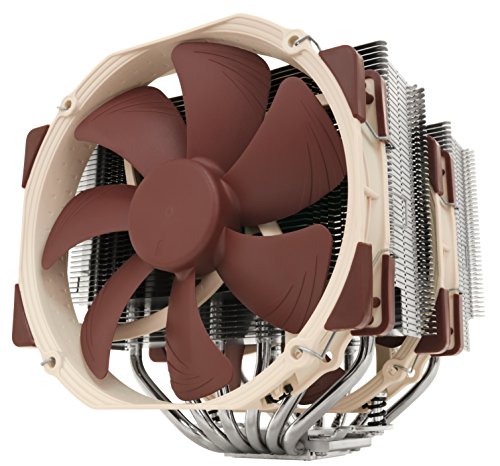

Quick answer: For most builders, a large dual-tower air cooler is the simplest and most reliable choice. The Noctua NH-D15 is the classic pick for high-end air cooling, the Thermalright Peerless Assassin 120 SE ARGB gives dual-tower performance in a smaller and lighter package, and the ARCTIC Liquid Freezer III Pro 360 is the strongest choice for a builder who has room for a 360 mm radiator and wants maximum headroom for a hot flagship processor. The DeepCool AK620 suits tall memory kits, and the Cooler Master Hyper 212 Black covers modest processors.
Quick Picks
Our Short List of 3
- Type: Dual-tower air cooler
- Fans: 2 x NF-A15 140 mm PWM, up to 1500 RPM
- Heat pipes: 6 copper heat pipes
- Height: 165 mm
- Type: Dual-tower air cooler
- Fans: 2 x 120 mm ARGB PWM, up to 1550 RPM
- Heat pipes: 6 heat pipes with AGHP technology
- Height: 155 mm

- Type: 360 mm AIO liquid cooler
- Radiator: 398 x 120 x 38 mm aluminum
- Fans: 3 x P12 Pro 120 mm PWM, plus a VRM fan on the pump block
- Pump: 800 to 2800 RPM, PWM controlled
All 4 Picks at a Glance
| Product | Specs | Action |
|---|---|---|
| 1. Noctua NH-D15 |
| Check price on Amazon |
| 2. Thermalright Peerless Assassin 120 SE ARGB |
| Check price on Amazon |
| 3. ARCTIC Liquid Freezer III Pro 360 |
| Check price on Amazon |
 5. Cooler Master Hyper 212 Black |
| Check price on Amazon |
How to Choose
Match the Cooler to the Processor
Start with the processor, not the cooler. A mainstream six-core or eight-core chip used for gaming and office work produces far less heat than a flagship sixteen-core chip running all-core renders for hours. Cooler makers publish a TDP rating or a thermal capacity figure, and that number is a useful first filter. For a mid-range processor, a single-tower cooler with four heat pipes is usually enough. For a high-end gaming processor, a dual-tower air cooler or a 240 mm liquid cooler is safer. For a flagship chip under sustained loads, a large dual tower or a 360 mm liquid cooler gives the most headroom.
Air Cooling or Liquid Cooling
Air coolers move heat through copper heat pipes into aluminum fin stacks, and fans push air through those fins. They have no pump, no liquid, and no radiator to mount, so there is little that can fail beyond a fan.
All-in-one liquid coolers move heat through liquid to a radiator mounted on the case. A 360 mm radiator has far more surface area than any air tower, which is why the strongest liquid coolers lead on peak thermal headroom. Liquid cooling also moves the bulk of the cooler away from the motherboard. The trade-offs are a pump that adds a small amount of noise and a moving part, plus the need for radiator mounting space and care with tube routing. Choose air for simplicity and longevity, and liquid when the processor needs the extra surface area.
Check Case Clearance First
Clearance is the most common reason a cooler has to go back. For an air cooler, check the case maker’s maximum CPU cooler height and compare it with the cooler’s stated height, including any fan that sits higher than the fin stack. Tall memory can push the front fan upward, which adds height.
For a liquid cooler, check radiator support by position: a 360 mm radiator needs three 120 mm fan mounts in a row, usually at the front or top of the case. The ARCTIC model in this guide uses a 38 mm thick radiator, thicker than the common 27 mm size, so check both the length and the depth of the mounting area,
Confirm Socket Support in the Box
A cooler is only useful if its mounting hardware fits the motherboard socket. Current desktop sockets include AMD AM5 and AM4 and Intel LGA1851 and LGA1700, with older LGA1200 and LGA115x boards still in service. Older designs may need a separate mounting kit for a newer socket. Read the socket list on the exact listing being ordered, not just the model name, because the same model name can hide several revisions with different brackets in the box. This matters most for the Noctua NH-D15 and the DeepCool AK620 in this guide.
Noise, Fan Size, and Fan Speed
Larger fans move the same amount of air at lower speeds, which is why 140 mm fans are usually quieter than 120 mm fans at the same cooling output. Fan noise ratings are measured by the maker under its own conditions, so treat them as a rough comparison rather than an exact promise. PWM fans are the standard for CPU cooling: a four-pin connector lets the board adjust fan speed based on processor temperature. Dual-fan coolers need either two fan headers on the board or a PWM splitter cable, which most dual-tower coolers include.
Memory Clearance and Motherboard Layout
Dual-tower coolers are wide, and the front fan often hangs over the memory slots nearest the processor. Makers publish a RAM clearance figure, which is the height of memory that fits under the front fan in its standard position. Standard memory without tall heat spreaders usually fits, but tall gaming memory may need the fan raised, a single-fan setup, or a cooler with a cut-out fin profile. Also check the top PCIe slot, since some wide coolers overhang it.
Warranty and Long-Term Support
A CPU cooler is a long-lived part that often survives several processor upgrades, so warranty and spare parts matter. Noctua offers a six-year warranty on its flagship coolers and sells mounting kits for new sockets, ARCTIC offers a six-year warranty on the Liquid Freezer III Pro series. Thermalright, DeepCool, and Cooler Master offer shorter warranties, typically two to three years, so check the listing for the exact term.
The Best Best CPU Coolers Reviewed
1. Noctua NH-D15
- Type: Dual-tower air cooler
- Fans: 2 x NF-A15 140 mm PWM, up to 1500 RPM
- Heat pipes: 6 copper heat pipes
- Height: 165 mm
The Noctua NH-D15 is the reference dual-tower air cooler that other air coolers are measured against. It pairs two aluminum fin stacks with six copper heat pipes and two NF-A15 140 mm PWM fans, and it includes NT-H1 thermal compound, low-noise adapters, and a SecuFirm2 mounting system with a screwdriver in the box. In a build, it suits a high-end processor in a mid-tower or larger case where quiet operation matters.
One point needs care before ordering. The original NH-D15 dates from before the newest sockets, so the bracket included in the box depends on the revision being sold. Some current stock includes the newer hardware, while older stock may need a separate kit for LGA1700, LGA1851, or AM5. Check the socket list on the exact listing and confirm the bracket is included for the board being used.
2. Thermalright Peerless Assassin 120 SE ARGB
- Type: Dual-tower air cooler
- Fans: 2 x 120 mm ARGB PWM, up to 1550 RPM
- Heat pipes: 6 heat pipes with AGHP technology
- Height: 155 mm
The Thermalright Peerless Assassin 120 SE ARGB is a dual-tower air cooler that brings six heat pipes and two 120 mm PWM fans into a 155 mm tall package. The ARGB version adds addressable lighting to the fans, and the cooler includes mounting hardware for AMD AM4 and AM5 and Intel LGA1700, LGA1851, LGA1200, and LGA115x sockets. The fans run at up to 1550 RPM, and the cooler ships with thermal paste included.
This is the pick for a builder who wants dual-tower cooling without the height and weight of the largest towers. At 155 mm tall, it fits cases that rule out a 165 mm or 168 mm cooler, and the dual-fan layout still gives strong headroom for a high-end gaming processor. The plain non-RGB version is a separate listing, so order the ARGB listing linked below for the lighted fans. Note the naming: Thermalright sells several Peerless Assassin 120 SE revisions, including a V2 and a V3, each with its own listing and ASIN. The ASIN below is the original ARGB version described here.
3. ARCTIC Liquid Freezer III Pro 360
- Type: 360 mm AIO liquid cooler
- Radiator: 398 x 120 x 38 mm aluminum
- Fans: 3 x P12 Pro 120 mm PWM, plus a VRM fan on the pump block
- Pump: 800 to 2800 RPM, PWM controlled
The ARCTIC Liquid Freezer III Pro 360 is a 360 mm all-in-one liquid cooler built around a 38 mm thick aluminum radiator, three P12 Pro 120 mm PWM fans, and a pump block with a small VRM fan that pushes air over the motherboard socket area. The cooler includes MX-6 thermal compound, an offset mount for AMD AM5, and a contact frame for Intel LGA1851 and LGA1700.
This is the strongest thermal pick in this guide for a builder with a case that takes a 360 mm radiator. The thick radiator and three fans give a large surface area for sustained all-core loads. The fit limits are clear: a 360 mm radiator needs a case with three 120 mm mounts in a row, and the 38 mm depth needs more clearance than a standard 27 mm radiator. The socket list covers AMD AM5 and AM4 and Intel LGA1851 and LGA1700 only, so owners of older Intel boards should check for a separate kit.
4. DeepCool AK620
The DeepCool AK620 is a dual-tower air cooler with six nickel-plated copper heat pipes, two FK120 120 mm fluid dynamic bearing fans, and a maker-stated 260W TDP rating, the highest stated rating among the air coolers in this guide. The fin stacks use a cut-out profile that leaves a stated 43 mm of clearance for standard memory, and a low-noise adapter is included. The AK620 suits a high-TDP gaming processor in a build with tall memory.
Check the socket list before ordering. The listing for this ASIN names Intel LGA1700, LGA1200, LGA1151, LGA1150, and LGA1155 and AMD AM5 and AM4, and it does not name LGA1851. A builder on a newest-generation Intel board should confirm whether the bracket for that socket is in the box or available separately. Digital versions of the AK620 with a status display are separate listings.
- Type: Dual-tower air cooler
- Fans: 2 x FK120 120 mm PWM, 500 to 1850 RPM
- Heat pipes: 6 nickel-plated copper heat pipes
- TDP rating: 260W, maker stated
- Dimensions: 129 x 138 x 160 mm
- RAM clearance: 43 mm, maker stated
- Sockets: Intel LGA1700, LGA1200, and LGA115x, AMD AM5 and AM4
5. Cooler Master Hyper 212 Black
- Type: Single-tower air cooler
- Fan: 1 x SickleFlow 120 Edge PWM, 690 to 2500 RPM
- Heat pipes: 4 copper heat pipes
- Height: 152 mm
The Cooler Master Hyper 212 Black is a single-tower air cooler with four copper heat pipes, a copper base, and one SickleFlow 120 Edge PWM fan. The fan runs from 690 to 2500 RPM, and the cooler stands 152 mm tall, which fits cases that cannot take a dual tower. The listing names support for AMD AM5 and AM4 and Intel LGA1851, LGA1700, and LGA1200, and it includes CryoFuze thermal paste in the box.
This is the pick for a modest processor, a first build, or a compact case. A single tower with one fan is simpler to install than a dual tower, and it leaves the memory slots clear. It is not the right match for a flagship processor under sustained all-core loads, but for a mainstream gaming processor it is a proven and practical choice. The Hyper 212 line has been revised many times, and other variants are separate listings, so order from the listing linked below.
What to Check Before You Buy
Measure twice and order once. Check the case maker’s maximum CPU cooler height against the cooler’s stated height, and check radiator support by position and thickness for a liquid cooler. Then check the motherboard socket against the socket list on the exact listing, including whether the bracket is in the box or sold separately.
Next, check memory clearance. Look up the height of the memory kit and compare it with the cooler’s stated RAM clearance. If the memory is tall, look for a cooler with a cut-out fin profile, an offset mount, or a front fan that can be raised. Check the fan headers on the motherboard as well: a dual-fan cooler needs two headers or a splitter cable, and a liquid cooler needs a header for the pump plus headers for the radiator fans. An ARGB version needs a three-pin ARGB header on the board, or the lighting will not work.
Plan the install before the parts arrive: read the cooler maker’s install guide for the exact socket, and apply the included thermal compound as directed. A cooler mounted loosely or with too little compound will run hot no matter how good its design is. Finally, confirm the listing itself: model names repeat across revisions, colors, and lighting versions, and each version has its own ASIN. Match the ASIN, fan count, radiator size, and socket list on the listing being ordered against the cooler described here.
FAQ
Do I need a liquid cooler for gaming?
No. For most gaming processors, a good dual-tower air cooler is enough, because gaming loads a processor in bursts rather than holding every core at full load for hours. A liquid cooler earns its place with a flagship chip under sustained all-core work, such as rendering, or when the build needs the clearance of a remote radiator.
How tall can my air cooler be?
It depends on the case. Every case maker publishes a maximum CPU cooler height, and that figure is the hard limit. Measure the cooler height with the fans fitted, and remember that tall memory can push the front fan upward and add height. If the cooler is even a few millimeters too tall, the side panel will not close, so leave a small margin.
Will a dual-tower cooler block my RAM?
It can, which is why RAM clearance matters. Standard memory usually fits under the front fan, but tall gaming memory may clash. Check the cooler’s stated RAM clearance against the memory height, and look for a cut-out fin profile, an offset mount, or a fan that can be raised. The DeepCool AK620 in this guide offers a stated 43 mm of clearance.
Does an AIO liquid cooler need maintenance?
An all-in-one liquid cooler is sealed at the factory and needs no refilling or routine servicing. The practical maintenance is the same as for an air cooler: keep the radiator fins and fans free of dust, and check that the pump header is connected. If the pump fails, temperatures rise quickly, so a temperature monitor with an alert is a sensible addition.
Can I reuse a CPU cooler on a new processor?
Often, yes. Air coolers in particular can last through several builds, as long as the mounting hardware fits the new socket. Before reusing a cooler, check the socket list for the new board, clean the old thermal compound from the base, and apply fresh compound.
Bottom Line
The best CPU coolers are the ones that match the processor, fit the case, and clear the memory without drama. For most builders, a dual-tower air cooler is the sweet spot: the Noctua NH-D15 for quiet high-end cooling, the Thermalright Peerless Assassin 120 SE ARGB for strong cooling in a smaller tower, or the DeepCool AK620 for a high-TDP processor with tall memory. The Cooler Master Hyper 212 Black covers modest processors and compact cases, and the ARCTIC Liquid Freezer III Pro 360 is the pick when a flagship processor and a 360 mm radiator mount call for maximum headroom. Measure the case and confirm the socket brackets in the box.
Disclosure: As an Amazon Associate, we may earn from qualifying purchases.