Our Short List of 3

- Best for: Builders planning a multi-radiator custom loop in a conventional full tower layout.
- Case type: Full Tower
- Motherboard support: E-ATX, ATX, Micro-ATX, Mini-ITX
- Included fans: Three 140mm AirGuide fans
- Radiator support: Up to three 360mm radiators simultaneously
- Best for: A premium showcase build with a very long graphics card and a large cooling setup.
- Case type: Full Tower
- Motherboard support: E-ATX
- Included fans: Four 140mm fans
- Radiator support: Up to two 420mm radiators

- Best for: Custom loop builders who want three large radiators and a reversible, glass-fronted layout.
- Case type: Full Tower
- Motherboard support: E-ATX up to 280mm
- Radiator support: Up to three 420mm radiators
- Panels: Front and side tempered glass panels
All 5 Picks at a Glance
| Product | Specs | Action |
|---|---|---|
| Corsair 7000D AIRFLOW |
| Check price on Amazon |
| ASUS ROG Hyperion GR701 |
| Check price on Amazon |
| Lian Li O11 Dynamic EVO XL |
| Check price on Amazon |
 Cooler Master HAF 700 EVO |
| Check price on Amazon |
 Antec Performance 1 FT |
| Check price on Amazon |
Key takeaways
- Compare five full tower PC cases for large GPUs, tall coolers and multi-radiator cooling, with E-ATX support, airflow and space checked before you choose.
A full tower case is a commitment to a certain kind of build, one where a long graphics card, a thick radiator, several storage drives, and a tangle of cables all have to live together without fighting for room. Choosing badly means a graphics card that will not fit, a radiator that blocks the motherboard tray, or a side panel that refuses to close once the cables are routed. The real decision is not which case looks largest in a photograph, but which interior layout matches the hardware you already own or plan to buy next.
This guide is for builders planning a high-end gaming rig, a workstation with an E-ATX board and several expansion cards, or a custom cooling loop with more than one radiator. Each case below was chosen from the name and specifications shown on its Amazon product page, with attention to motherboard support, radiator space, included fans, and clearance for long graphics cards.
Quick Picks
As an Amazon Associate we earn from qualifying purchases
| Product | Best for | Key spec from title |
|---|---|---|
| Corsair 7000D AIRFLOW | A builder who wants three 360mm radiators in one case | Full-tower case with three 140mm AirGuide fans |
| ASUS ROG Hyperion GR701 | A showcase build with a very long graphics card | E-ATX full-tower case with support for two 420mm radiators |
| Lian Li O11 Dynamic EVO XL | A custom loop with three large radiators and a reversible layout | Full-tower case with support for up to three 420mm radiators |
| Cooler Master HAF 700 EVO | A builder who wants a display and flexible radiator mounting | Full-tower E-ATX case with five pre-installed fans and Iris LCD |
| Antec Performance 1 FT | A high-airflow build with dual glass panels and a temperature display | Full-tower E-ATX case with three PWM fans and Type-C |
How to Choose
Measure the graphics card first
Graphics card length decides more full tower purchases than any other single number, because a card that is a few millimetres too long turns an expensive case into a return. Check the maximum GPU length on the Amazon product page, then measure the card itself, including any shroud overhang and the power connectors at its end. A case that lists 450mm of clearance leaves generous room for most current flagship cards, while a 400mm limit can still work if the card is a shorter dual-fan model. Leave space for the front fans or radiator too, since a thick front radiator can steal 50mm or more from the usable length.
Match the motherboard, not just the socket
Full tower cases exist largely because E-ATX boards, server boards, and boards with extra expansion slots need width as well as height. Confirm that the case lists E-ATX support and, where the listing gives it, the maximum board width it accepts, because some E-ATX boards are wider than others. A board that overhangs the tray can block cable routing holes and cover drive mounts. Builders with a standard ATX board can still benefit from a full tower, but the extra width matters most when the board carries several add-in cards, a capture card, or a second network card alongside a large graphics card.
Plan radiators before fans
Fan count alone tells you little about cooling, since radiator placement decides whether a loop fits at all. Decide where each radiator will sit, front, top, or side, and check the supported size at each position on the product page. A case that takes three 360mm radiators gives a custom loop real freedom, while a case limited to two 420mm radiators suits a simpler dual-radiator plan. Remember that a radiator plus fans is thicker than fans alone, so check CPU cooler height and memory clearance as well, especially when a top radiator hangs over the motherboard.
Check the front panel and the ports you will reach daily
A solid glass front looks striking in photographs and can still choke airflow if the intake path is narrow, while a steel or mesh front with a clear intake path keeps component temperatures lower under sustained load. Look at the front panel material and the included fans together, since three large intake fans behind a mesh front behave very differently from the same fans behind a sealed panel. Front ports matter every day too: a Type-C port on the front panel, enough USB ports for a headset and a controller, and a headphone jack in a reachable spot save constant reaching around the back of the case.
The 5 Best Options
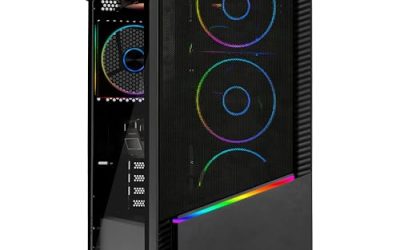
Corsair 7000D AIRFLOW
- Best for: Builders planning a multi-radiator custom loop in a conventional full tower layout.
- Case type: Full Tower
- Motherboard support: E-ATX, ATX, Micro-ATX, Mini-ITX
- Included fans: Three 140mm AirGuide fans
- Radiator support: Up to three 360mm radiators simultaneously
Builders planning a multi-radiator custom loop in a conventional full tower layout.
Confirm the radiator thickness and fan combination at each mount, since a thick radiator can reduce clearance for long graphics cards.
The Corsair 7000D AIRFLOW suits builders who want maximum radiator room in a traditional tower shape, with a steel front panel built for intake rather than display. Its interior holds three radiators at once, which makes it a strong home for a custom loop cooling both a processor and a graphics card. Three large included fans give the case a solid starting point, and the hinged tempered glass side panel makes later changes easier than a panel held by four separate screws. Cable routing runs through a single hidden channel, which helps when a large build also means many fan and pump cables.
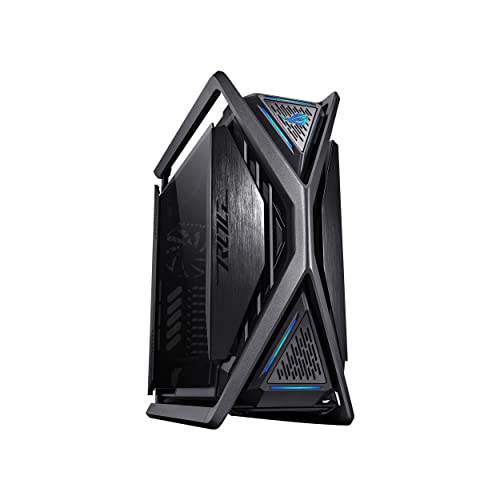
ASUS ROG Hyperion GR701
- Best for: A premium showcase build with a very long graphics card and a large cooling setup.
- Case type: Full Tower
- Motherboard support: E-ATX
- Included fans: Four 140mm fans
- Radiator support: Up to two 420mm radiators
A premium showcase build with a very long graphics card and a large cooling setup.
Check the depth of the desk or floor space first, since this is a large and heavy case that needs a stable surface.
The ASUS ROG Hyperion GR701 is built around a semi-open structure and a diecast aluminum-alloy frame, which gives it a different character from a plain steel tower. Four large fans come pre-installed, and support for two 420mm radiators makes it a natural fit for a large all-in-one cooler paired with a second radiator in a custom loop. Graphics card clearance reaches 460mm, so very long cards fit without forcing the builder to remove front fans. Tool-free side panels and a built-in graphics card holder address two practical annoyances of heavy builds: access during assembly and sag from a long, heavy card.
Lian Li O11 Dynamic EVO XL
- Best for: Custom loop builders who want three large radiators and a reversible, glass-fronted layout.
- Case type: Full Tower
- Motherboard support: E-ATX up to 280mm
- Radiator support: Up to three 420mm radiators
- Panels: Front and side tempered glass panels
Custom loop builders who want three large radiators and a reversible, glass-fronted layout.
Plan fan purchases carefully, since the case is sold without the full set of fans its mounts can hold.
The Lian Li O11 Dynamic EVO XL takes the familiar dual-chamber look of the O11 family and scales it up to full tower size, with front and side tempered glass panels that show the whole build. Its reversible chassis lets the builder flip the layout, which matters when the case will be viewed from the opposite side. Support for up to three 420mm radiators puts it among the most flexible cases here for custom cooling, and the E-ATX support covers large workstation boards. ARGB lighting strips are built in, so the case needs no extra strip kit to light the interior edges.
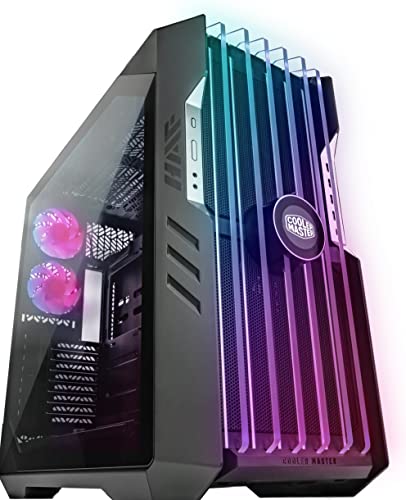
Cooler Master HAF 700 EVO
- Best for: Builders who want a built-in display, flexible radiator brackets, and five fans included.
- Case type: Full Tower
- Motherboard support: E-ATX
- Included fans: Five pre-installed fans
- Display: Iris LCD real-time display
Builders who want a built-in display, flexible radiator brackets, and five fans included.
Check the software and connection needed for the LCD display before assuming it will show the readings you want.
The Cooler Master HAF 700 EVO carries the HAF name into a full tower built for airflow and for builders who like to adjust their cooling layout. Five fans come pre-installed, and the rotatable radiator brackets let the builder change the angle of a radiator mount instead of accepting a fixed position. An Iris LCD display on the case shows real-time system information at a glance, which suits a build that will sit on a desk where the display stays visible. The tempered glass side panel and ARGB edge-lit blades give the interior a finished look without adding a separate lighting kit.
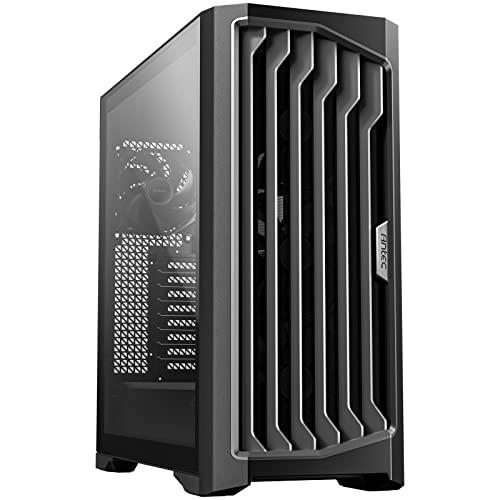
Antec Performance 1 FT
- Best for: High-airflow builds where a mesh front, dual glass panels, and a temperature display matter.
- Case type: Full Tower
- Motherboard support: E-ATX
- Included fans: Three PWM fans
- Side panels: Dual tempered glass side panels
High-airflow builds where a mesh front, dual glass panels, and a temperature display matter.
Count the included fans against the mounts you plan to fill, since extra fans may be needed for a full cooling setup.
The Antec Performance 1 FT is the most airflow-focused case in this group, with a high-airflow mesh front panel and dual tempered glass side panels that open the interior from both sides. A temperature display on the case gives a quick read on system status without opening monitoring software, and the removable top bracket makes installing a top radiator or a large air cooler far less awkward. Three PWM fans come included, and the case supports RTX 40 series graphics cards, which covers the long cards many builders are actually installing. Its E-ATX support makes it a practical pick when cooling matters more than a sealed glass look.
Which One Fits Your Situation
You are building a custom water cooling loop
Choose the Lian Li O11 Dynamic EVO XL if the loop needs three large radiators, or the Corsair 7000D AIRFLOW if three 360mm radiators fit the plan better. Both cases give a loop room to breathe, and the Lian Li adds a reversible layout for desks where the case will be viewed from the left. Check pump and reservoir mounting space before ordering fittings, since radiator support alone does not guarantee room for every reservoir shape.
You bought the longest graphics card you could find
Choose the ASUS ROG Hyperion GR701, with 460mm of graphics card clearance and a built-in holder to support the card once it is installed. The Corsair 7000D AIRFLOW is the fallback at 450mm, which still covers most long cards. Measure the card with its power connectors attached, and leave room for front intake fans or a front radiator that could shorten the usable length.
You want strong airflow without a complicated build
Choose the Antec Performance 1 FT, whose mesh front panel and included PWM fans give a straightforward path to good airflow. Add fans only where the build actually needs them, and use the temperature display as a quick check during long gaming or rendering sessions. This is the simplest route in this group to a cool, quiet full tower without planning a custom loop.
You want a display and flexible radiator mounting on the case itself
Choose the Cooler Master HAF 700 EVO, which pairs five included fans with rotatable radiator brackets and an Iris LCD display. It suits a desk build where the case stays in view and the display remains useful. Confirm the display connection and the radiator bracket angles during assembly, since both features reward a little extra planning before the motherboard goes in.
Common Mistakes
- Buying a full tower for a standard ATX build with a short graphics card and a single air cooler, then leaving most of the interior empty.
- Measuring the graphics card without its power connectors, then finding the front radiator leaves no room to plug them in.
- Choosing a glass front panel for a build that runs hot under sustained load, without checking the intake path behind it.
- Ordering a large radiator without checking its thickness plus fans against CPU cooler height and memory clearance.
- Filling every fan mount at once instead of planning intake and exhaust as a balanced path through the case.
Frequently Asked Questions
Does a full tower case cool better than a mid tower case?
A full tower cools better when its extra space is used well, with intake and exhaust paths and radiators placed where air can move through them. A large empty case with poor fan placement can cool worse than a smaller case with a direct airflow path. Choose the case for the hardware it must hold, then plan the fans and radiators as one system rather than adding mounts at random.
Can I fit an E-ATX motherboard in every full tower case?
No, because E-ATX is a family of board sizes rather than one fixed width, and some boards are wider than others. Check the maximum board width listed on the product page and compare it with the board you own. A board that overhangs the tray can block cable holes and drive mounts, so the width number matters as much as the E-ATX label itself.
How many radiators do I need for a custom cooling loop?
Most custom loops work well with two radiators, one for the processor and one for the graphics card, or a single large radiator for a processor-only loop. Three radiators suit very high heat loads or quiet operation at low fan speeds. More radiator space helps only when the pump, fittings, and reservoir also fit, so plan the whole loop before choosing the case.
Is a tempered glass side panel a problem for airflow?
A tempered glass side panel does not block airflow by itself, because air enters through the front, bottom, or side intake and leaves through the rear and top. Problems come from a sealed front panel or blocked intake, not from the side glass. Keep the intake path clear, leave room behind the motherboard tray for cables, and clean the intake filters regularly to keep airflow steady.